
Backing up your vocabulary with iTunes in Avaz 1.1
We just released a minor update of Avaz into the App store. Here are the major features * Backup functionality has been added through iTunes. You can now back up your vocabulary and transfer it between iPads if you want to. * Restoring the default vocabulary is faster * A few minor bug-fixes The backup functionality was something that many people asked for. While we’re working on a new backup mechanism for v1.2, this one has the basics covered. To back up your vocabulary from Avaz, please connect your iPad to your computer and open iTunes. Click on the “Apps” button and then go to the “File Sharing” section. You will see a screenshot similar to the one below: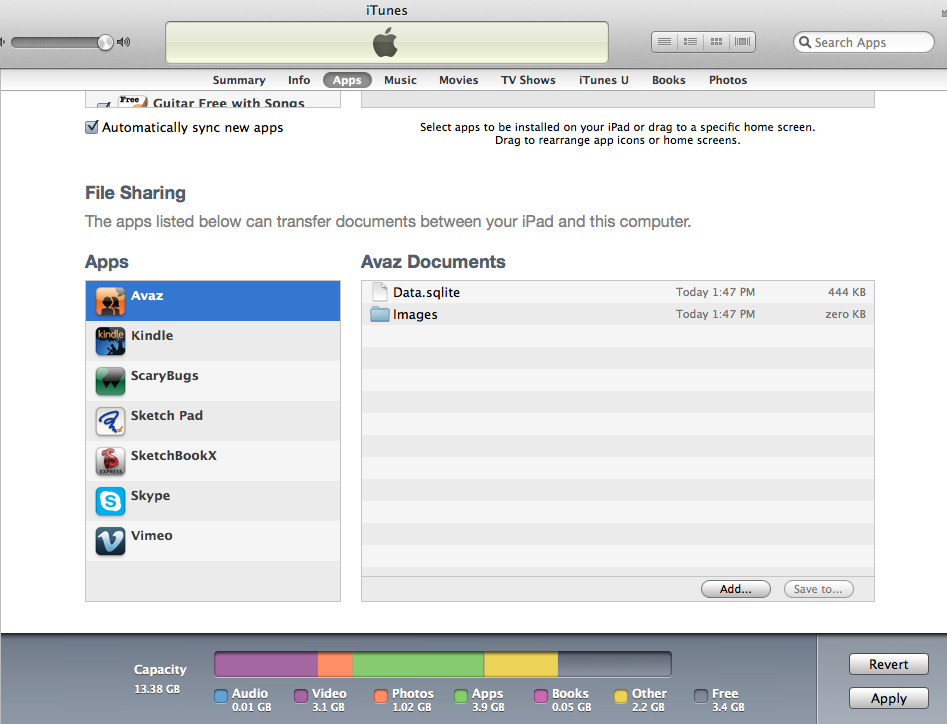 Please take a copy of the Data.sqlite file – this contains the vocabulary. You can also take a backup of all the custom images you have added to the app, through the “Take Photo” and “Choose Photo” buttons.
To restore your vocabulary, replace the Data.sqlite file in the iPad with the one in your backup. If you have lost your photographs, you will need to re-import them through iPhoto.
You will also need to restart the app to see your changes take effect.
Now you can use Avaz in your therapy sessions without worrying about losing all of your changes!
Please take a copy of the Data.sqlite file – this contains the vocabulary. You can also take a backup of all the custom images you have added to the app, through the “Take Photo” and “Choose Photo” buttons.
To restore your vocabulary, replace the Data.sqlite file in the iPad with the one in your backup. If you have lost your photographs, you will need to re-import them through iPhoto.
You will also need to restart the app to see your changes take effect.
Now you can use Avaz in your therapy sessions without worrying about losing all of your changes! admin January 15th, 2013
Posted In: Blog